How to Build an AI Banking and Finance Assistant with Agents in ConvoFlow
Design a complete banking flow in ConvoFlow: conditional routing, real-time loan quotes with code, and automatic CRM logging.

The new standard for conversational banking
In financial services, customers expect to quote a loan, check credit card benefits, or book an advisory session directly from WhatsApp or web chat, without endless numbered menus ("Press 1 for...") and without being sent to external forms that kill conversion.
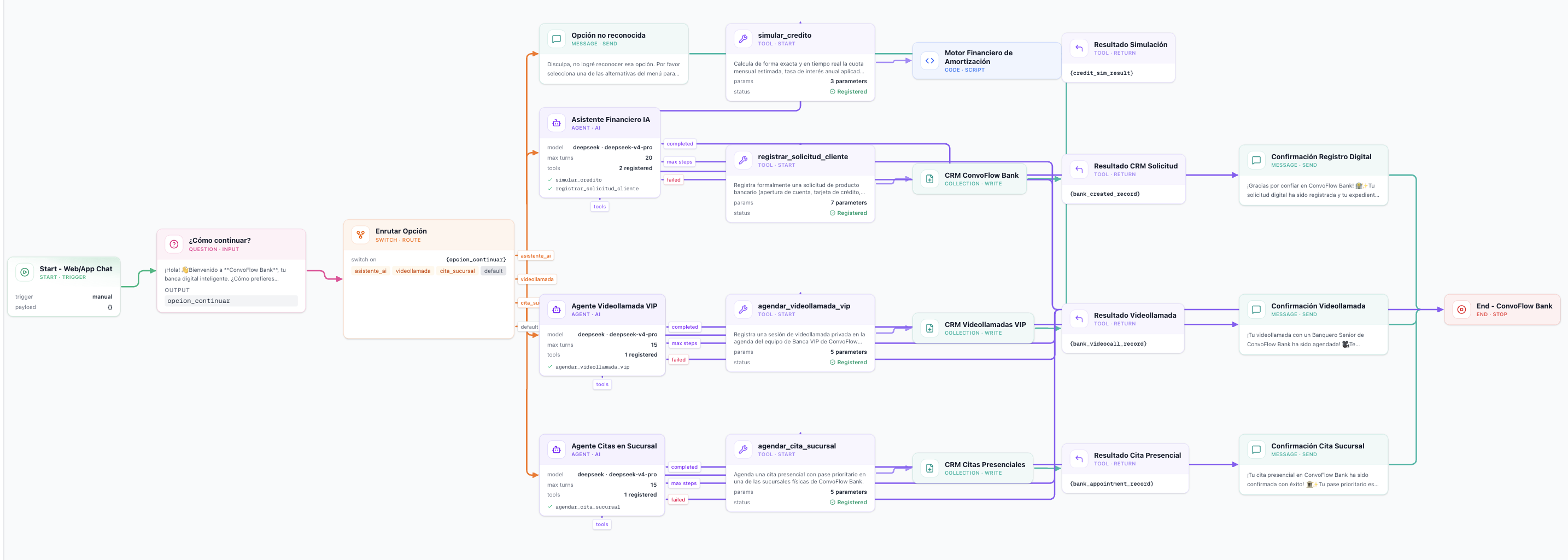
This step-by-step guide shows how to build ConvoFlow Bank, a bank-grade visual flow created in ConvoFlow, capable of:
- Routing the customer intelligently based on preference (AI Assistant, VIP Video Call, or Branch Appointment).
- Serving them with an Autonomous Financial Agent (
deepseek-v4-pro) trained on the bank's product catalog. - Calculating loans live with a financial amortization engine programmed in a code node.
- Logging digital case files in the CRM in a fully automated way.
Canvas overview
Step 1: Entry point and initial routing
Every flow starts with a trigger node. Use Start for the web widget; if you want to publish on WhatsApp, use WhatsApp Trigger, which connects to the active channels (WhatsApp Business Cloud API).
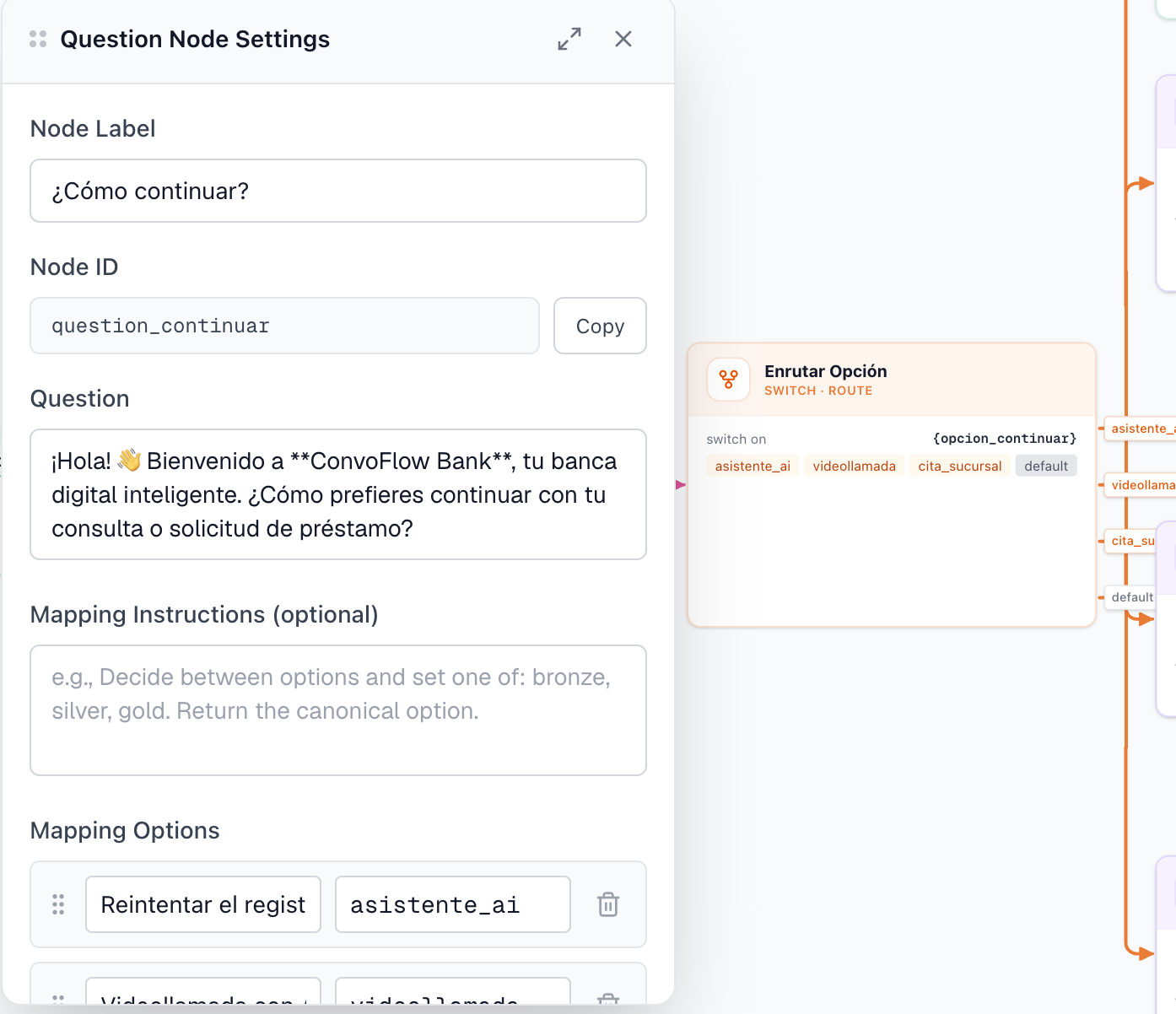
1. The question node
To keep the experience clear, greet the user and let them choose their preferred support channel.
- Variable name:
opcion_continuar - Question:
Hello! 👋 Welcome to ConvoFlow Bank, your smart digital banking. How would you like to continue with your inquiry or loan request? - Options mapping:
Continue with the AI Assistant→ value:asistente_aiVideo call with a VIP Advisor→ value:videollamadaBranch appointment→ value:cita_sucursal
Switch and Question configuration
2. The switch node
The switch node evaluates the opcion_continuar variable and, based on its value, takes one of the following paths:
- If it is
asistente_ai→ Connects to the input port of the AI Financial Agent. - If it is
videollamada→ Connects to the VIP Video Call Agent. - If it is
cita_sucursal→ Connects to the Branch Appointment Agent. - Default output: If the user enters unrecognized text, they are routed to
msg_invalid_optionso the flow can politely ask for a valid option without breaking the experience.
Step 2: Configuring the Autonomous Financial Agent
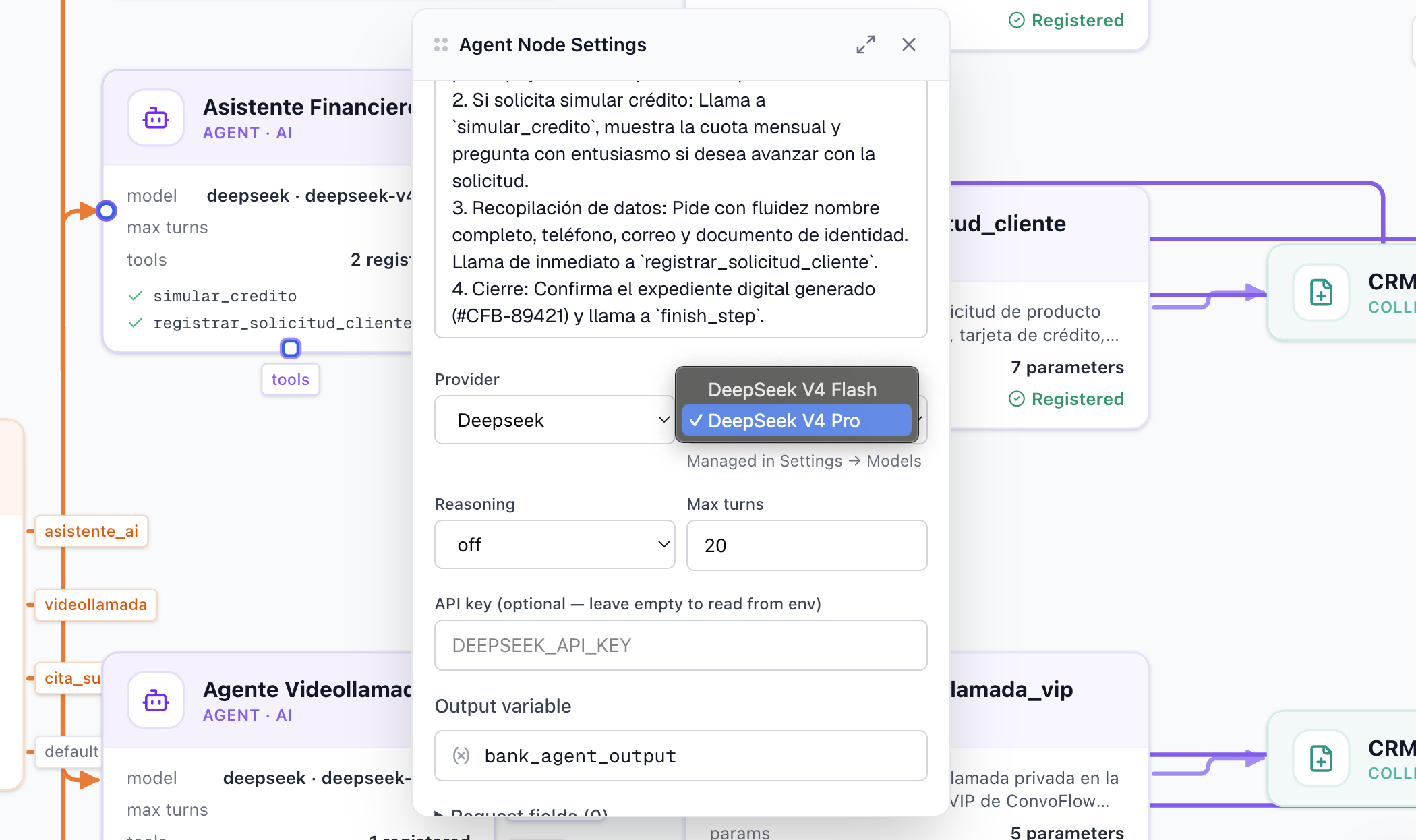
The heart of self-service is the Agent node. Here you configure the model (e.g. deepseek-v4-pro), the operational step limit (maxSteps: 20), and its System Prompt.
The System Prompt
The prompt is divided into three core blocks:
- Personality and tone: Empathetic, professional, with no rigid numbered menus.
- Embedded knowledge base:
- Zero Digital Account: $0 opening and maintenance, free 24/7 transfers, physical and virtual debit card.
- Pro Yield Account: 8.5% APY with daily settlement and interest on demand balances.
- Credit cards: Black (3% travel cashback + LoungeKey VIP) and Platinum (2% on groceries and fuel).
- Express Personal Loans: From $1,000 to $25,000 USD, terms of 6 to 60 months, rates from 11.9% annual, disbursement in 15 minutes.
- Operational rules:
- If the user asks to quote or calculate a loan → Immediately invoke
simular_credito. - If the user wants to apply for the product → Ask for name, phone, email, and ID, then call
registrar_solicitud_cliente.
- If the user asks to quote or calculate a loan → Immediately invoke
You can connect as many tools as you need and use the available nodes to extend their functionality. In this example only the code node and the collection node are used, but you can use any node from the catalog.
AI Agent settings panel
Step 3: Creating tools
Instead of letting the AI invent numbers (which would produce unacceptable hallucinations in finance), ConvoFlow gives you deterministic tools.
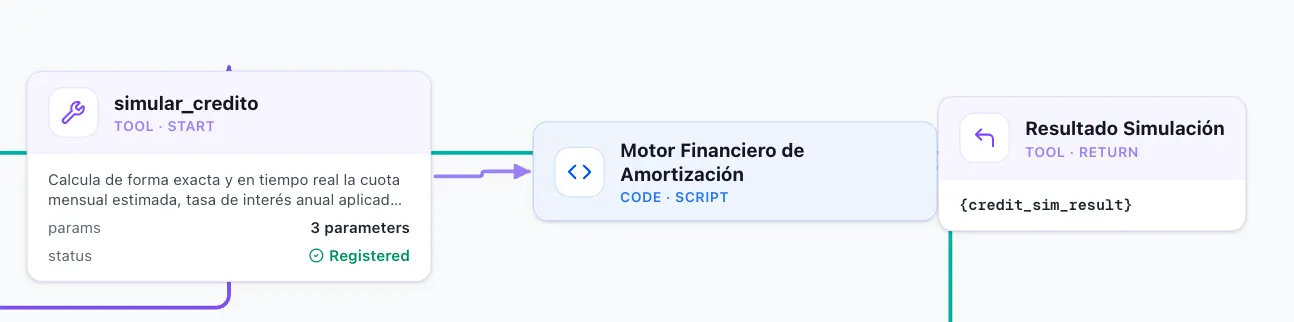
Subflow for the simular_credito tool:
The tools connector on the Agent node links to:
Tools in ConvoFlow
-
Start Tool Node(tool_simular_credito): Defines the parameters the LLM must extract:monto(number, required): Requested amount (e.g. $10,000).plazoMeses(number, required): Term in months (e.g. 24).tipoCredito(string, required):'personal','vehicular', or'hipotecario'.
-
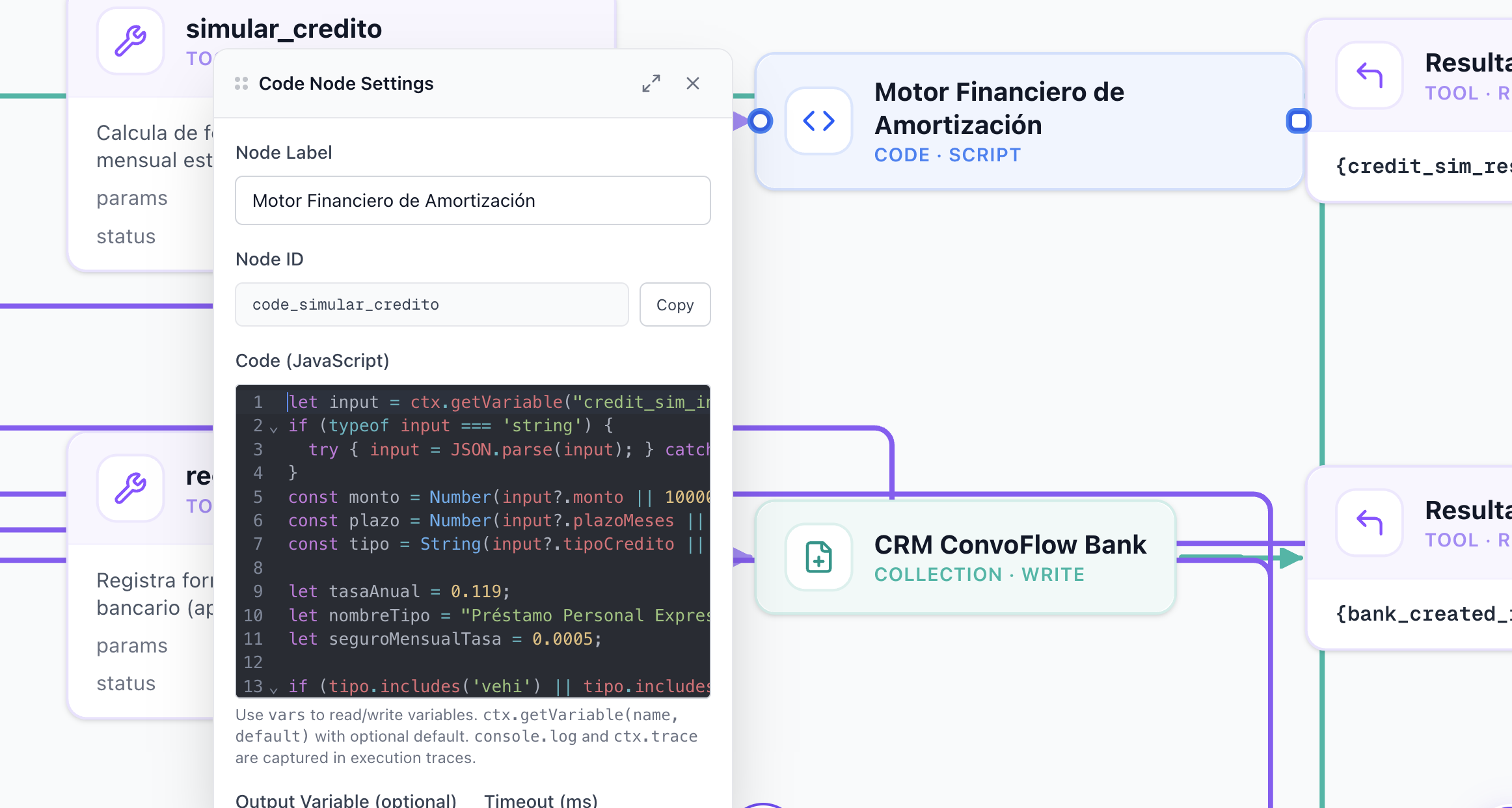
codeNode(code_simular_credito): Runs the French amortization formula directly in JavaScript:
let input = ctx.getVariable("credit_sim_input");
if (typeof input === 'string') {
  try { input = JSON.parse(input); } catch(e) {}
}

const monto = Number(input?.monto || 10000);
const plazo = Number(input?.plazoMeses || 24);
const tipo = String(input?.tipoCredito || 'personal').toLowerCase();

let tasaAnual = 0.119; // 11.9% Personal
let nombreTipo = "Express Personal Loan";
let seguroMensualTasa = 0.0005;

if (tipo.includes('vehi') || tipo.includes('auto')) {
  tasaAnual = 0.089;
  nombreTipo = "ConvoFlow Auto Loan";
} else if (tipo.includes('hipo') || tipo.includes('vivienda')) {
  tasaAnual = 0.065;
  nombreTipo = "ConvoFlow Mortgage";
}

// Monthly installment calculation (amortization formula)
const tasaMensual = tasaAnual / 12;
const cuotaCapitalInteres = monto * (tasaMensual * Math.pow(1 + tasaMensual, plazo)) / (Math.pow(1 + tasaMensual, plazo) - 1);
const seguroMensual = monto * seguroMensualTasa;
const cuotaTotalMensual = Math.round((cuotaCapitalInteres + seguroMensual) * 100) / 100;
const totalPagar = Math.round((cuotaTotalMensual * plazo) * 100) / 100;
const totalIntereses = Math.round((totalPagar - monto) * 100) / 100;

return JSON.stringify({
  status: "success",
  tipoCredito: nombreTipo,
  montoSolicitado: monto,
  plazoMeses: plazo,
  tasaInteresAnual: `${(tasaAnual * 100).toFixed(1)}%`,
  cuotaMensualEstimada: cuotaTotalMensual,
  totalInteresesEstimados: totalIntereses,
  montoTotalFinal: totalPagar,
  beneficios: [
    "No penalty for early prepayments",
    "Digital disbursement in 15 minutes to your ConvoFlow Account"
  ]
});
Return Tool Result(tool_res_simular_credito): Returns the formatted result to the agent context so it can reply to the user with a clear, persuasive, and exact message.
Code tool subflow
Step 4: Saving applications to the CRM without code
When the customer decides to formalize their loan application or account opening, the agent invokes the registrar_solicitud_cliente tool.
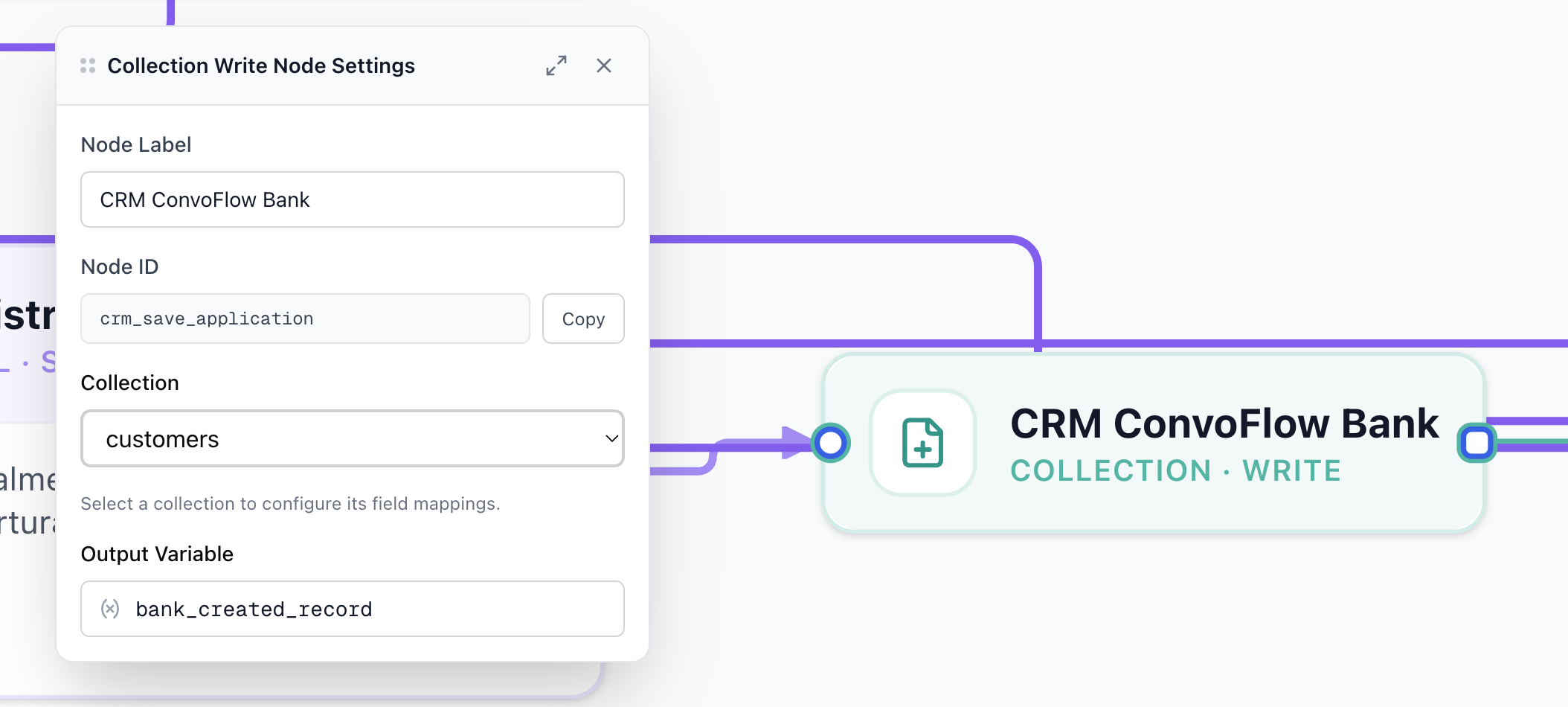
Instead of requiring complex external API calls with manual authentication, ConvoFlow includes the collectionWriteNode:
CRM tool subflow

CRM field mapping:
- Destination collection:
col-convoflow-bank-leads-2026 - Declarative mapping:
full_name➔{bank_application_data.nombreCompleto}phone➔{bank_application_data.telefono}email➔{bank_application_data.email}document_id➔{bank_application_data.documentoIdentidad}product_interest➔{bank_application_data.productoInteres}monthly_income➔{bank_application_data.ingresoMensualAprox}channel➔"Asistente Virtual IA ConvoFlow"status➔"PRE_APROBADO_EN_REVISION"
The node generates a case ID (e.g. #CFB-89421) and the agent closes the conversation by sending a professional confirmation through the completed port to msg_confirm_completion.
Collection Write node and CRM
Step 5: Hybrid paths — VIP video call and in-person appointments
The real power of ConvoFlow is that it does not force every customer down the same funnel. Two additional agents live on the same canvas:
1. VIP Video Call branch (agent_videollamada)
- Designed for wealth or corporate banking clients.
- Collects preferred date and time, plus the consultation topic.
- Invokes the
agendar_videollamada_viptool, which writes to thecol-convoflow-bank-videocalls-2026collection and returns the secure connection URL (https://meet.convoflowbank.com/vip-session).
2. Branch Appointment branch (agent_cita_sucursal)
- Offers the available branches (Torre ConvoFlow Central, Zona 10, Plaza Real).
- Logs the appointment in
col-convoflow-bank-appointments-2026and issues a priority access pass with reserved parking (#VIP-4029).
Step 6: State handling and flow resilience
To guarantee enterprise-level stability, every Agent in ConvoFlow exposes output handles for every possible execution state:
| Node output | When it fires | Destination in the flow |
|---|---|---|
completed | The agent fulfilled the goal and called finish_step. | Matching success message (msg_confirm_*) ➔ endNode. |
max_steps | The interaction exceeded the configured step limit (prevents infinite loops). | Direct connection to endNode or handoff to a human support agent. |
failed | An unexpected network or tool-execution error occurred. | Contingency message ➔ endNode. |
Conclusion
With ConvoFlow, any product or engineering team can orchestrate powerful, secure conversational flows connected to their databases in a matter of hours.
Frequently Asked Questions
What makes ConvoFlow different from a conventional chatbot builder?
ConvoFlow combines deterministic nodes (fixed rules, questions, and switches) with agentic nodes (advanced language models such as DeepSeek, Claude, or GPT with tool-calling capabilities). This lets the agent run mathematical formulas in JavaScript code or write to CRM collections in real time, without leaving the conversation thread.
How does ConvoFlow calculate loan installments?
Through a tool subflow (startToolNode → codeNode → returnToolResultNode). When the user requests a quote, the agent extracts the parameters (amount, term, loan type) and runs a financial amortization formula in a secure code node, returning the exact installment instantly.
Are customer details saved to the CRM automatically?
Yes. Using the collectionWriteNode, ConvoFlow maps the data the agent captures naturally (name, phone, email, government ID) directly into internal or external CRM collections, generating a digital case file with a unique ID.